How To Lock iPhone Apps With iOS 18

Main Image
  • Like
  • Comment
  • Share

Apple’s latest software update for iPhones, iOS 18, solves a major issue users have been complaining about: the ability to lock apps. The feature is useful, particularly when users hand over their phones to someone else. Locked apps require biometric verification, such as Touch ID or Face ID. Hence, if the rightful owner of the iPhone isn’t around, someone else won’t be able to open the app. Here’s how you can lock apps without using any shortcuts on iOS 18.

Before proceeding, it is important to mention that the steps in this article are based on iOS 18’s public beta. Although they shouldn’t change with the stable version, we’ll update the article if anything differs.

ALSO SEE: Xiaomi AMOLED Display Mobile Phones

Here’s How You Can Lock Apps In iOS 18
Here's How You Can Lock Apps In iOS 18
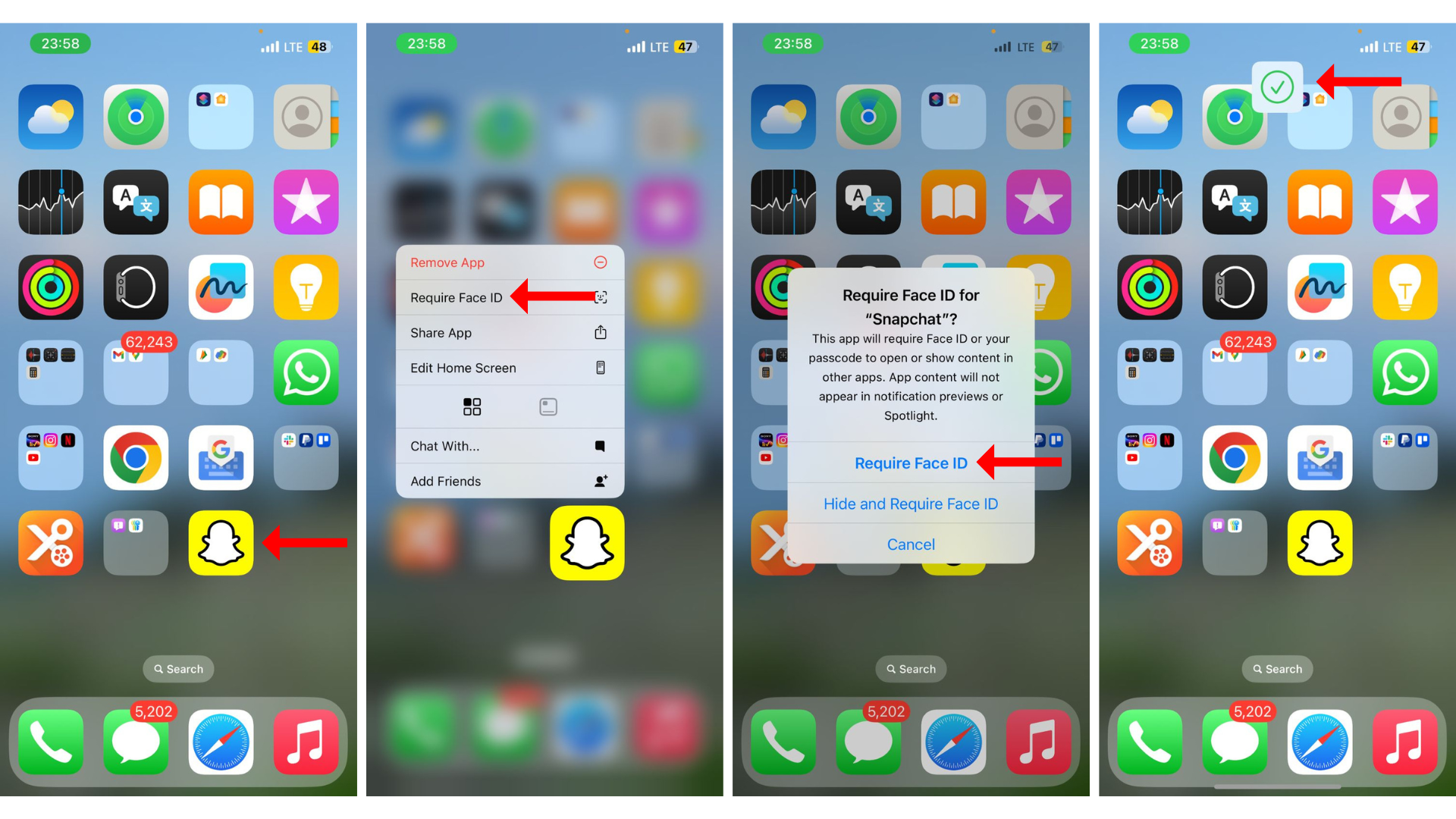
  • On the home screen, press and hold on an app’s icon.
  • In the menu that appears, hit “Require Face ID.”
  • The operating system will inform you what locking the app entails. “This app will require Face ID or your passcode to open or show content in other apps. App content will not appear in notification previews or Spotlight.” Tap on “Require Face ID” below the message.
  • The iPhone will scan your face (if it supports Face ID) or take a fingerprint scan (if it supports Touch ID) to lock the app.
  • Now, when you try to open the app, iOS will ask for the Face ID or Touch ID you entered while locking.

How To Unlock An App In iOS 18?
How To Unlock An App In iOS 18 (1)
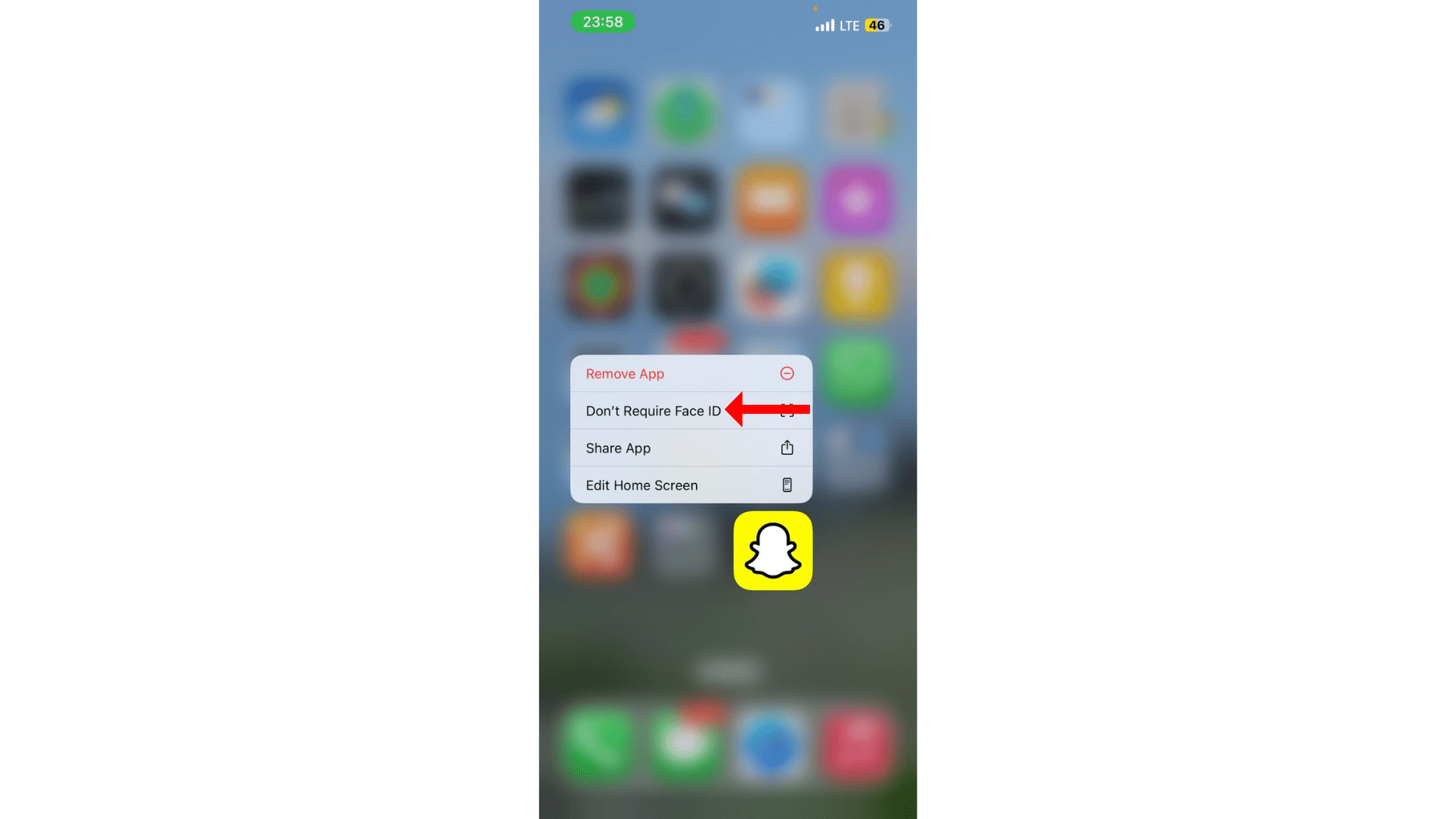
  • If you wish to unlock an app, simply press and hold its icon on the home screen and select “Don’t Require Face ID.”
  • With Stolen Device Protection enabled, the phone will require a biometric scan to confirm the action and unlock an app.

ALSO SEE: iQOO 5G Mobile Phones Under ₹20,000

Things To Know Before Locking An App On iOS 18

First and foremost, you can lock almost every app on iOS 18, including some stock apps like Fitness, Stocks, and Wallet. Third-party apps, like those for social media (like Instagram), messaging (like WhatsApp), and entertainment (like Netflix); all support the built-in app lock. Once you lock an app, it won’t be able to send its content to other apps. Further, it will not appear in notification previews or Spotlight searches. Apple’s voice assistant, Siri, also won’t be able to use the locked app.

While the app lock makes it easier to lock sensitive apps, what happens if someone knows the passcode to your iPhone? Well, if you’ve enabled Stolen Device Protection, no one will be able to access the app by entering the passcode. However, if the security feature isn’t enabled, a passcode can unlock the app (after three failed biometric attempts).

ALSO SEE: Intel Core Ultra 5 CPU Laptops

You can follow Smartprix on TwitterFacebookInstagram, and Google News. Visit smartprix.com for the latest tech and auto newsreviews, and guides.
Shikhar MehrotraShikhar Mehrotra
Shikhar Mehrotra is a seasoned technology writer and reviewer with over five years of experience covering consumer tech across India and global markets. At Smartprix, he has authored more than 1,700 articles, including news stories, features, comparisons, and product reviews spanning automobiles, smartphones, chipsets, wearables, laptops, home appliances, and operating systems. Shikhar has reviewed flagship devices such as the iPhone 16, Galaxy S25+, and Sennheiser HD 505 Open-Ear headphones. He also contributes regularly to Smartprix’s growing automotive section.

With a deep understanding of both iOS and Android ecosystems, Shikhar specializes in daily tech news, how-to explainers, product comparisons, and in-depth reviews. His DSLR photography in product reviews is recognized as among the best on the team.

Before joining Smartprix, Shikhar wrote for leading publications including Forbes Advisor India, Republic World, and ScreenRant. He holds a Bachelor of Arts in Journalism and Mass Communication from Amity University, Lucknow.

Related Articles

ImageApple’s first foldable iPhone could capture 22% of the market in year one: Report

Apple is notoriously late to new product categories, but a new report from IDC suggests its entry into the foldable smartphone market will be an immediate “turning point” for the industry. According to the latest data from the International Data Corporation (IDC), Apple’s long-rumored “iPhone Fold” is expected to launch in late 2026. Despite entering …

ImageBest iOS 16 Lock Screen Widget apps for your iPhone: Lock Screen Widgets for iPhone 14, iPhone 13 and more

iPhone users have been complaining about the unavailability of lock screen customization options but with the new iOS 16 update, Apple granted the wish. Now, iPhone users can personalize their Lock Screen with the five built-in widgets including Clock, Calendar, Weather, Reminders, and Fitness. Also, Apple is allowing third-party app developers to create their respective …

ImageBest iOS 16 features & here’s how you can try them out

Apple’s iOS 16 and watch OS 9 has rolled out for all the eligible devices. The iOS 16 update is around 3GB in size for iPhone users. The latest version of the iOS 16 comes with a plethora of new features. Check out the features and their application below. 1. Customizing Lock Screen The Lockscreen …

ImageApple Watch Finally Gets A WhatsApp App, iOS 26.2’s Beta Includes A Liquid Glass Slider For Lock Screen

WhatsApp is finally available as an app on your Apple Watch. Until now, smartwatch users have only received message notifications with an option to reply via the keyboard or using template messages. However, with the arrival of the WhatsApp app, users will be able to view call notifications, read full messages, and record/send voice notes. …

ImageiOS 26 & iPadOS 26 Stable Updates Announced: Check Release Date, New Features, & How To Install Here

The iPhone 17 series is official, and so is the iOS 26 stable update, which will soon be available for the compatible iPhone models. With the Liquid Glass design language, additions to the system apps like Messages, Phone, Camera, a revamped lock screen, and minor tweaks to other menus and layouts, iOS 26 is one …

Discuss

Be the first to leave a comment.