
How to record calls on Oppo, Realme, and OnePlus phones with ODialer?

Main Image
  • Like
  • Comment
  • Share

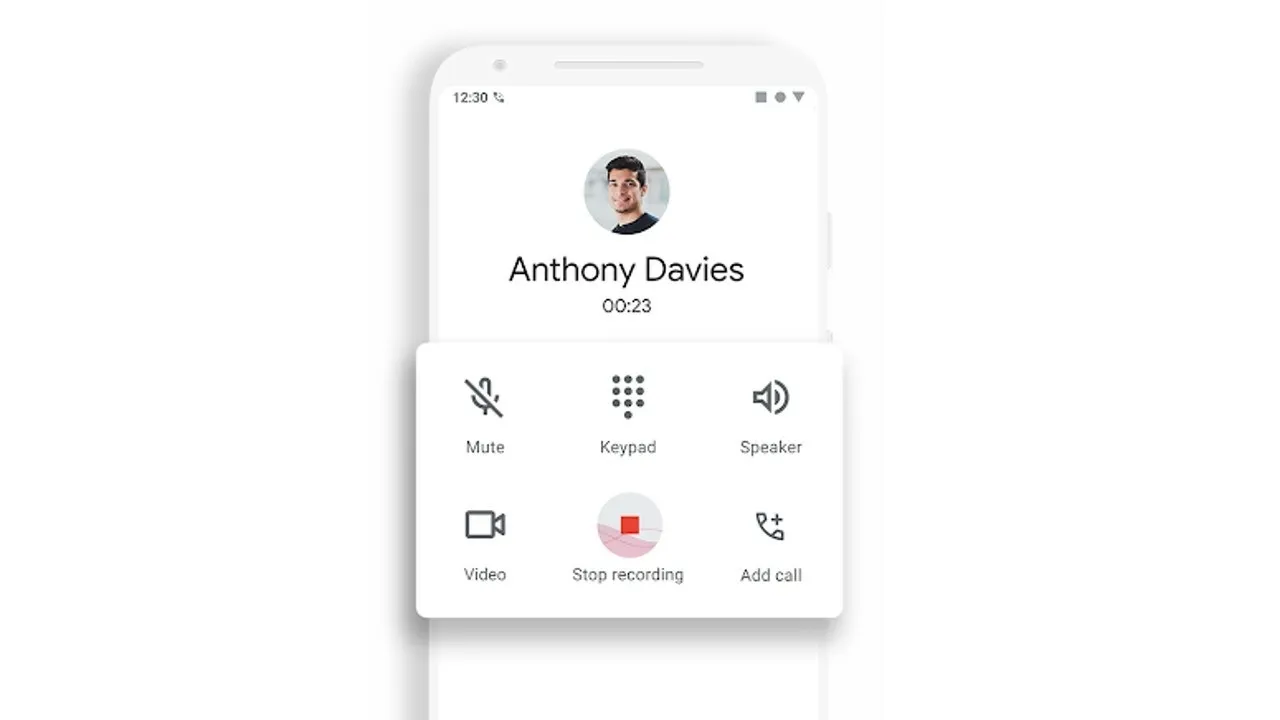
For some time now, Android phones have arrived with Google Dialer as a default app. It is way better than the pre-installed dialer app on many devices as it is equipped with a number of features including minimal and clutter-free UI. There’s a call recording option onboard too but users are looking for alternatives. ODialer from Oppo is a great alternative available on Google Play Store.

The difference between Google Dialer and Oppo ODialer is the fact that the latter doesn’t send the recipient a warning that a call is being recorded. Yes, those who are using Google Dialer should know that when they record a call, the recipient (the person on the other side of the call) gets a notification that the call is being recorded. For ODialer users, the app won’t trigger such a notification to the other users.

If you are curious about Google Dialer and how you can record calls on your Android phone, here’s a dedicated section for you.

How to record calls on Oppo, Realme, and OnePlus phones with ODialer?

Let’s see how you can actually record calls on Oppo, Realme, and OnePlus phones with ODialer. You do need Android 12 and above for compatibility to use ODialer. Here’s how you can record the calls.
Step #1: First up, download ODialer for your smartphone from Google Play Store and install it.
Step #2: Next, it will ask you for a bunch of permissions that you need to provide. It includes but is not limited to the ability to record calls, and media among others.
Step #3: You can check out the settings to let the app automatically record all the calls whatsoever.
Step #4: If you don’t want to record all the calls, you can record calls manually. Whenever you get a call or make one, tap on the record button and the particular call will be recorded.
Step #5: You can save the recorded call or delete it as per your wish.

That brings us to the end of how you can record calls on phones with ODialer. Note that it is not compatible with any smartphone makers outside the BBK Electronics realm. I tried using it on Samsung but didn’t work and the same goes for any other brand except those from Oppo i.e. Oppo, Realme, and OnePlus.

Related Articles

ImageOnePlus Nord 6 Roundup: Confirmed Launch Date, Specs, Expected Price, & Everything Else We Know

Amid its CEO stepping down and a global brand restructuring, OnePlus is gearing up to release the Nord 6 in India. The brand has confirmed the smartphone’s launch date, along with a couple of key specifications, which look quite impressive on paper. Ahead of the April 2026 launch, we’ve drafted a comprehensive roundup of the …

ImageAuto call recording is missing on new Android phones in India: How to Fix

Call recording, a feature we have long taken for granted, is no longer as seamless on most new Android phones in India. Customizable call recording has always been a noticeable omission on stock Android phones, and now many manufacturers including OnePlus, Xiaomi, Realme, Poco, and Oppo are replacing their dialer apps with google’s stock dialer …

ImageHow To Record Call On Xiaomi, Samsung, OnePlus, Realme, and Other Smartphones

For those who love to record calls for some reason be it just for the sake of recording to for security or privacy concerns, Google has tweaked its accessibility services API according to which, third-party apps won’t be able to use the call recording feature anymore. This sudden move has discouraged apps that have garnered …

ImageGalaxy A07 vs. Oppo K14x vs. Realme P4x: Which Budget 5G Phone Should You Buy?

If you’ve been hunting for a new 5G phone lately, you’ve probably experienced this: open three tabs, compare specs, close three tabs, question life choices. The Galaxy A07 5G, Oppo K14x 5G, and Realme P4x 5G sit dangerously close to each other in price, and at first glance, they seem almost identical. But dig a …

Imagerealme 16 Teased with Built-In Selfie Mirror; India Launch Expected Soon

realme has started teasing the realme 16 in India, highlighting a new hardware element on the back panel. The company calls it India’s first “Selfie Mirror Phone,” pointing to a small circular mirror placed next to the rear camera module. This mirror is about the size of a camera lens and is designed to help …

Discuss

Be the first to leave a comment.

Related Products